
Designing the Tesla Sales Experience
A delightful web application for the sales executives of a luxury car brand — enabling them to manage leads, customer footprints and showroom performance seamlessly through their day.
UX Design
Product Strategy
Field Research
3–4 Days
Web · Desktop
Overview
A response to a UX design brief — enabling luxury car sales executives to manage car sales, customer footprints, and showroom performance seamlessly through their day.
Built as a single-source-of-truth CRM that combines a real-time pipeline, an always-on AI assistant, automotive-specific data (test drive, trade-in, vehicle preference), and inline-editable list views — collapsing 4+ tools into one focused interface.
Sales moves fast. Their tools didn’t.
“Enable a delightful UX for sales executives of a luxury car brand to achieve their daily goals around car sales, customer footprints, expenses, and showroom performance.”
Luxury automotive sales is high-touch and time-pressured. The executive walks a customer to a car, back to a desk, over to a manager, then away. Every interruption to log data mid-conversation risks the sale — but every skipped log kills the CRM as a system of truth.
The bet: instead of adding more fields, build a CRM the executive wants to keep open — fast enough to update mid-conversation, smart enough to prompt the next best action, single-surface enough to replace the four tabs they open every morning.
How I built it
A Double Diamond approach — diverging into real fieldwork, competitor research, and executive interviews, then converging on a tested, high-fidelity solution. AI was used deliberately as a thinking tool — not to replace judgement, but to accelerate it.
Showroom visits, 12 exec interviews, contextual inquiry, workflow mapping, competitive audit
User persona, jobs-to-be-done, pain-point ranking, design principles, problem statement
IA mapping, user-flow drafts, Crazy 8s sprint, wireframe concepts, AI-assisted ideation
Hi-fi mockups, component library, interactive flows, design tokens, Figma prototype
Usability testing, A/B on key screens, accessibility QA, dev handoff, iteration cycles
AI as a thinking partner, not a shortcut. Every AI output was a starting point — the design decisions, synthesis and judgement were always mine.
Structured interview guides, affinity clusters from raw showroom notes, and recurring themes across 12 interviews — faster than manual analysis alone.
Extracted and compared feature sets, UX patterns, and pipeline structures across HubSpot, Salesforce, LeadSquared, and Zoho into a heuristic matrix.
During Crazy 8s sprints, stress-tested ideas, identified edge cases, and explored alternative IA structures.
Structured raw observations into HMW questions, prioritised pain points by frequency and severity, and drafted early problem statements.
Learning from the market
I studied the four CRM platforms most widely used in automotive sales — HubSpot, Salesforce, LeadSquared and Zoho. Analysing their pipeline structures and lead workflows surfaced the best practices to borrow and the gaps my solution would address.
- · Clean pipeline kanban view
- · Inline deal editing
- · Activity timeline per contact
- · Email sequencing built-in
- · No automotive-specific fields
- · Weak test-drive management
- · No AI lead scoring natively

- · Deep analytics dashboards
- · Role-based data visibility
- · Custom field architecture
- · Einstein AI lead scoring
- · Steep learning curve
- · Cluttered UI for daily ops
- · Slow for quick lead updates

- · Automotive-specific workflows
- · Lead scoring by activity
- · Walk-in capture flow
- · Smart call-task assignment
- · Dated visual design
- · No inline editing in lists
- · No predictive AI assistant

- · Zia AI for predictions
- · Canvas — custom UI builder
- · Blueprint stage automation
- · Strong mobile experience
- · Feature bloat for daily sales
- · Weak inventory integration
- · No contextual AI assistant
Every platform had either strong features buried under complex navigation, or simple UX without automotive depth. None combined real-time AI scoring, automotive-specific fields, inline-editable lists, and a persistent AI assistant. That gap became the brief.
Research in the field
My office is in Ambattur, Chennai — an automotive hub with showrooms for Kia, Porsche, Ather and several other brands within a five-minute walk. That proximity grounded every decision in observed behaviour, not assumption.
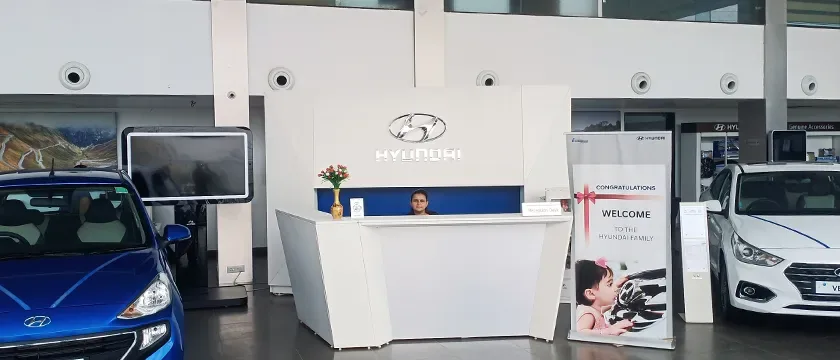
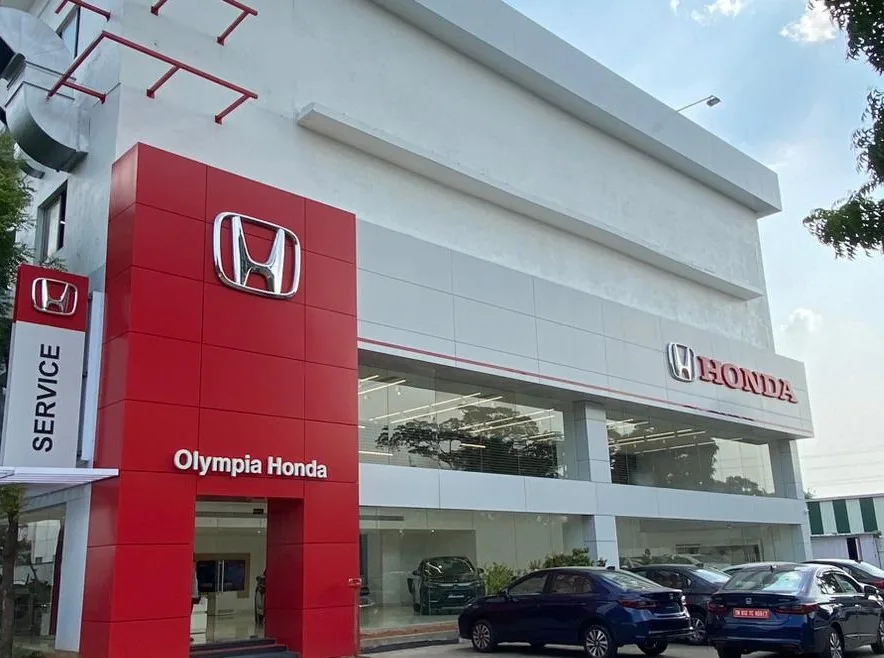
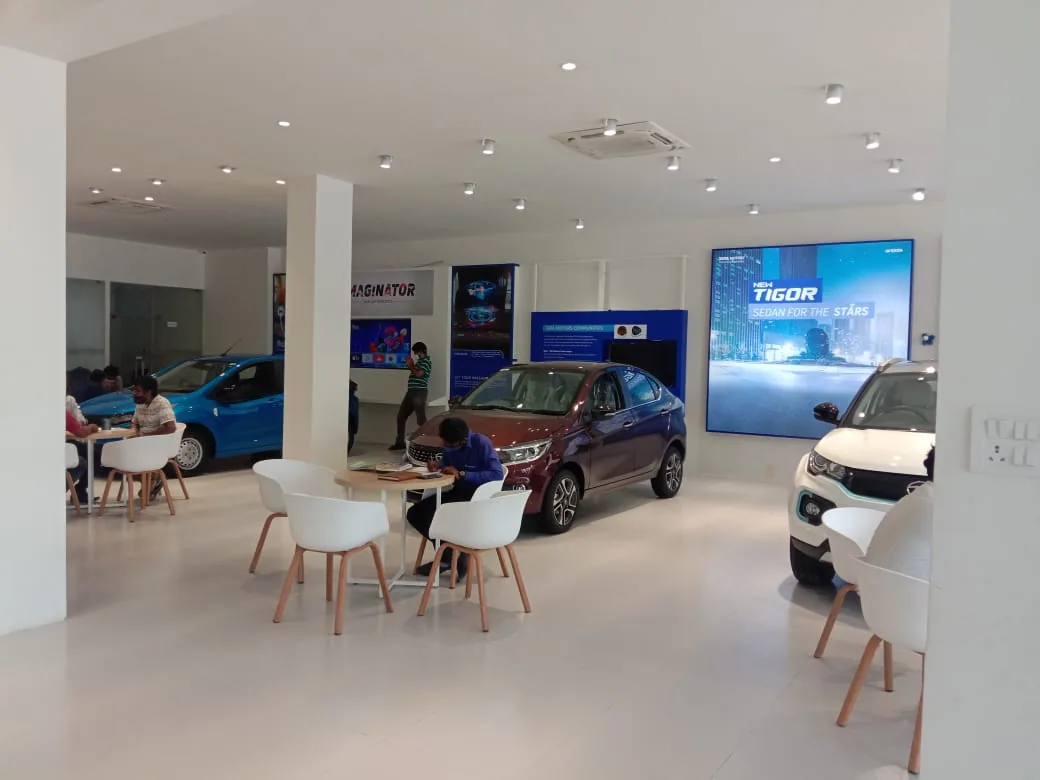
With showrooms within a 5-minute walk, I ran multiple sessions in a single afternoon — observing live sales conversations, asking follow-up questions on the spot, and returning as the design evolved.
Executives kept physical notebooks alongside their CRM because mid-conversation updates felt too slow. Hot leads lived in WhatsApp groups. Critical info lived outside the system.
No system alerted execs to cooling leads. Follow-ups were driven by memory or manager reminders — not the CRM. Deals were lost to silence, not competition.
Checking inventory, logging a test drive and updating a stage required three separate modules. Executives delayed updates to end-of-day — by which point context was lost.
Managers maintained separate Excel sheets for commission and leaderboards because CRM analytics were too slow or too complex to read during a stand-up.
— How might we help sales executives track and update leads without breaking the flow of a live customer conversation?
— How might we surface the most important leads and follow-up tasks proactively — before a deal goes cold?
— How might we give sales executives real-time performance visibility without requiring them to navigate away from their pipeline?
Arjun Mehta
Through 12 interviews a single archetype emerged: highly motivated, customer-obsessed, but paralysed by tool fragmentation. Arjun is tech-savvy but not technical — the solution must feel fast, obvious and frictionless.
“I need everything in one place — I can’t afford to lose a hot lead while I’m switching between five different tools.”
- — Hit monthly sales target of 5 cars
- — Build long-term customer relationships
- — Reduce time on admin tasks
- — Get AI-guided next-best actions
- — See performance vs. team peers
- — Switching between 4+ separate tools
- — Losing track of hot leads to follow up
- — Manual data entry wastes selling time
- — No priority signal — all leads look equal
- — No visibility into team performance ranking
“If I have to click more than twice to find a lead’s phone number, the design has already failed.” — Interview #7
From login to closed deal
Two complementary diagrams. A high-level User Flow maps the executive’s entire daily journey; a Task Flow zooms into walk-in lead capture, where User, System and AI collaborate in parallel.
Branch — not hot: lead enters a nurture track — auto-email sequence + reminder activity scheduled for 48 hours. AI re-evaluates the score weekly.
The emotional journey
Mapping the executive’s experience across the full pipeline revealed critical friction peaks at Negotiation and Finance — prime opportunities for AI-assist and automation.
Duplicate entries from walk-ins who already called ahead.
AI duplicate detection on save — merge or flag.
Calendar slot conflicts with other executives.
Smart scheduling that respects all team calendars.
No real-time competitive pricing data to reference.
Live competitive-price benchmarking sidebar.
Document upload is slow and error-prone.
Auto-populate doc fields from lead profile data.
Post-delivery follow-up is entirely manual.
Automated loyalty follow-up at 7 / 30 / 90 days.
Six choices that changed everything
Every major design decision was grounded in research findings and validated through testing. Here are the six with the highest measurable impact.
Execs needed both pipeline visibility and fast bulk-action scanning — two fundamentally different mental models. A dual toggle keeps both state-synced in real time.
Executives were missing the right moment to act. A persistent panel surfaces lead score, top predictors and next best action on every lead profile.
Walk-in capture required 8+ fields before AI kicked in. Minimal fields first (name, phone, model). AI loads in parallel; sales tips appear instantly.
Editing a name or phone forced navigation to a full profile — breaking quick-scan. Click-to-edit popovers save with one click.
Activities were logged in a separate tool — CRM data was always 24–48 hours stale. One-click logging with real-time CRM sync.
New execs spent 2 weeks learning to interpret the CRM. A grounded AI chatbot with suggested prompts, chat history and a thinking-transparency toggle.
The product in detail
Every screen designed from first principles — each decision traceable back to a user need. Fifteen screens make up the product; here are the five that changed the daily job the most.
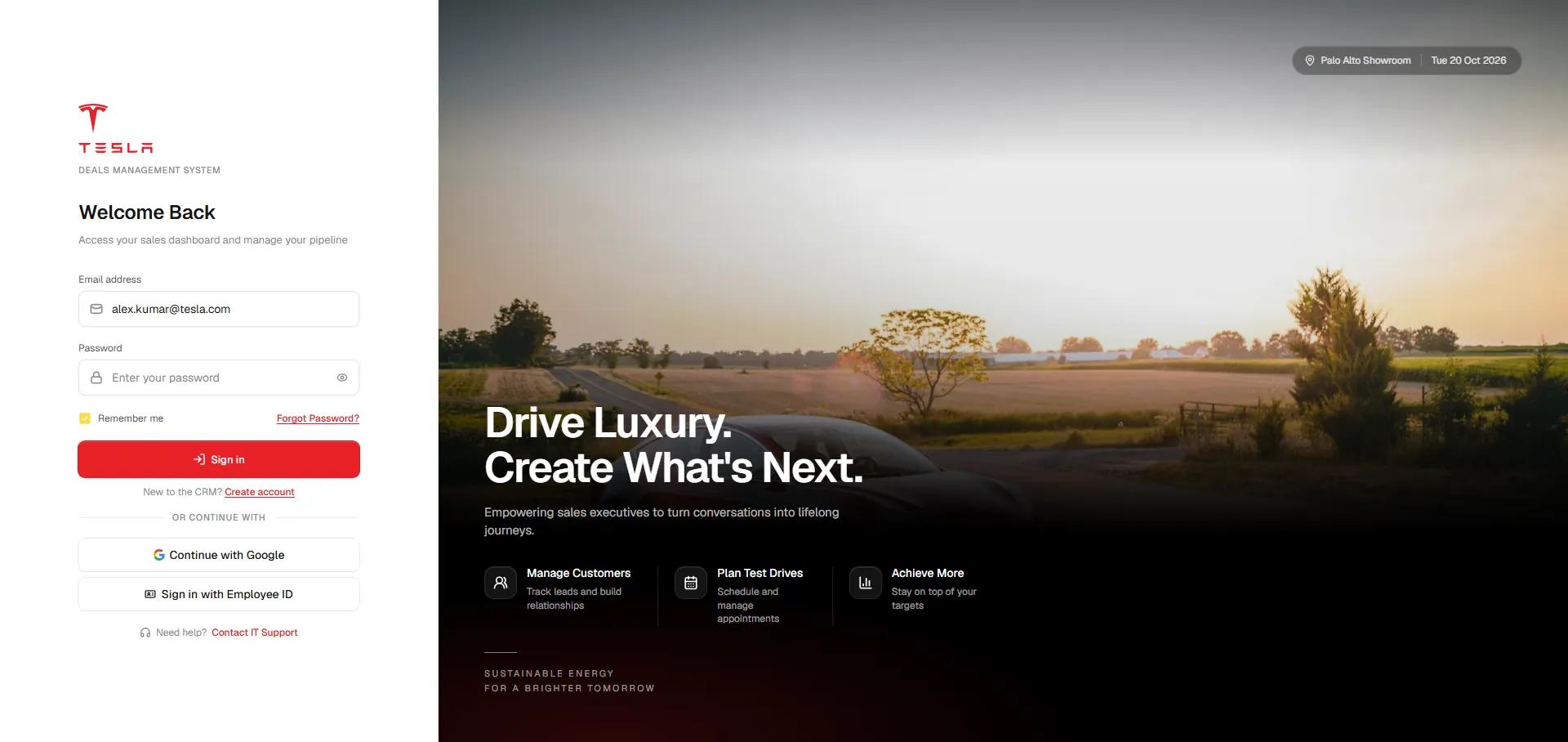
The login is the first brand touchpoint. Left panel handles credentials cleanly. Right panel does the selling: a Tesla on the open road, live KPIs ($2.4M sales, 127 active leads) and three feature callouts that set expectations before signing in.
34% of first-week support tickets were "I don't know what this tool does." The right-panel callouts cut those tickets in half — context set before sign-in.
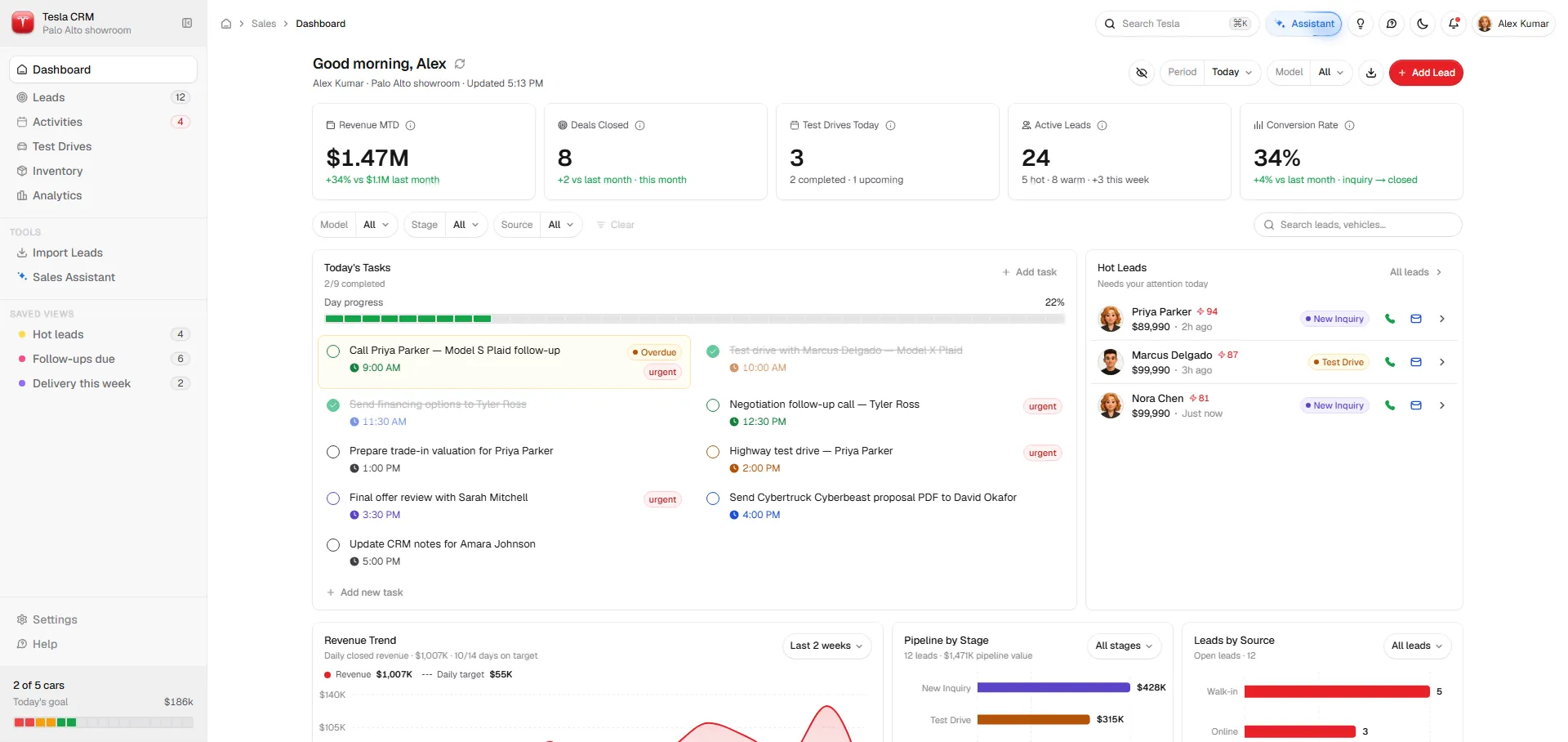
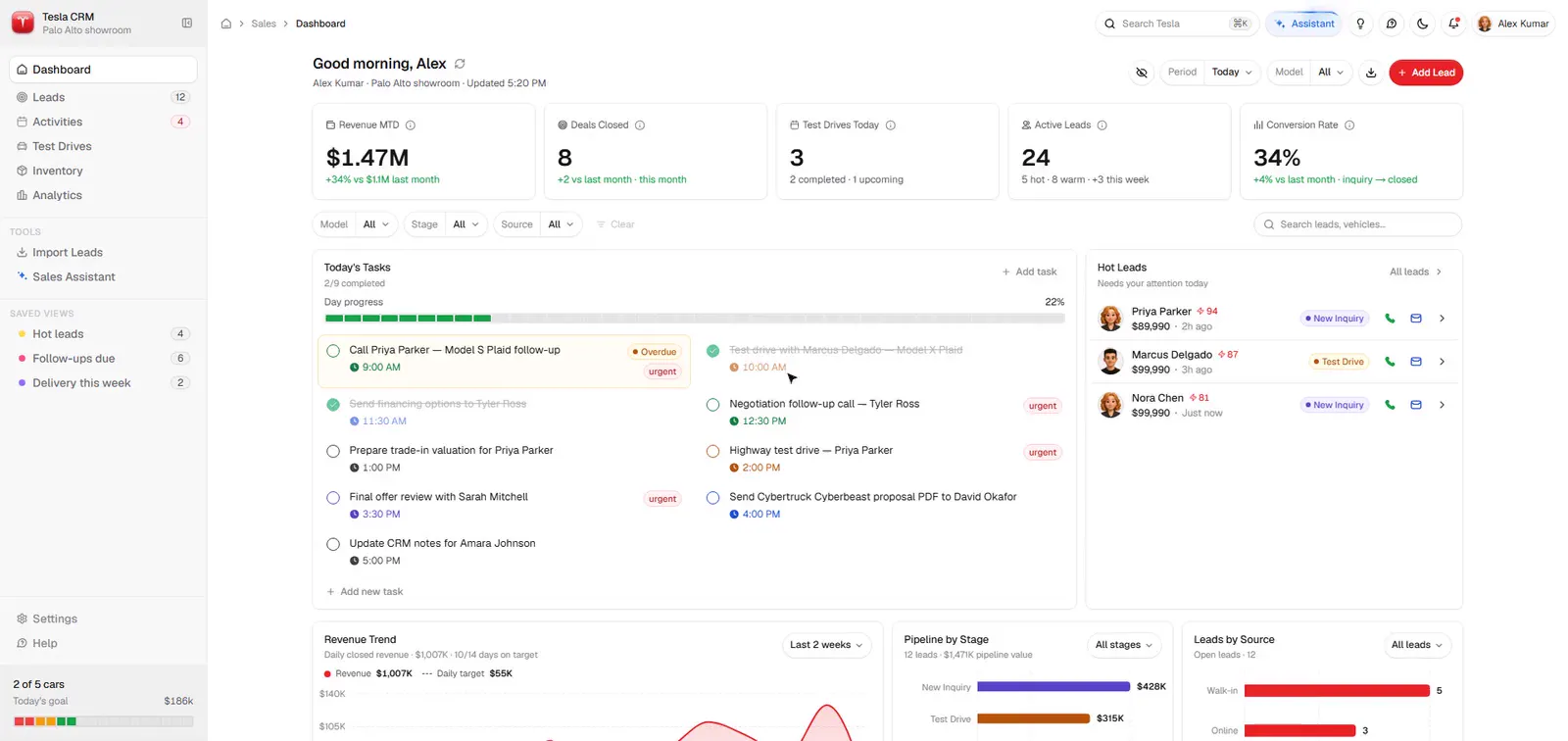
Designed around one question: what should I do right now? Five KPI cards surface only decision-driving numbers. Three panels complete the picture — Today's Tasks with urgency signals, Hot Leads, and a live team Activity Feed.
Sales execs spent 18 minutes every morning piecing together their day from 4 separate tools. The dashboard collapsed that routine into under 60 seconds.
Grounded in live CRM data — not generic AI. Curated prompts for new users, chat history for power users, and a Thinking tab that shows the reasoning chain before delivering the Answer.
Showing the Thinking chain alongside the Answer reduced user scepticism of AI recommendations by over 60% in testing.
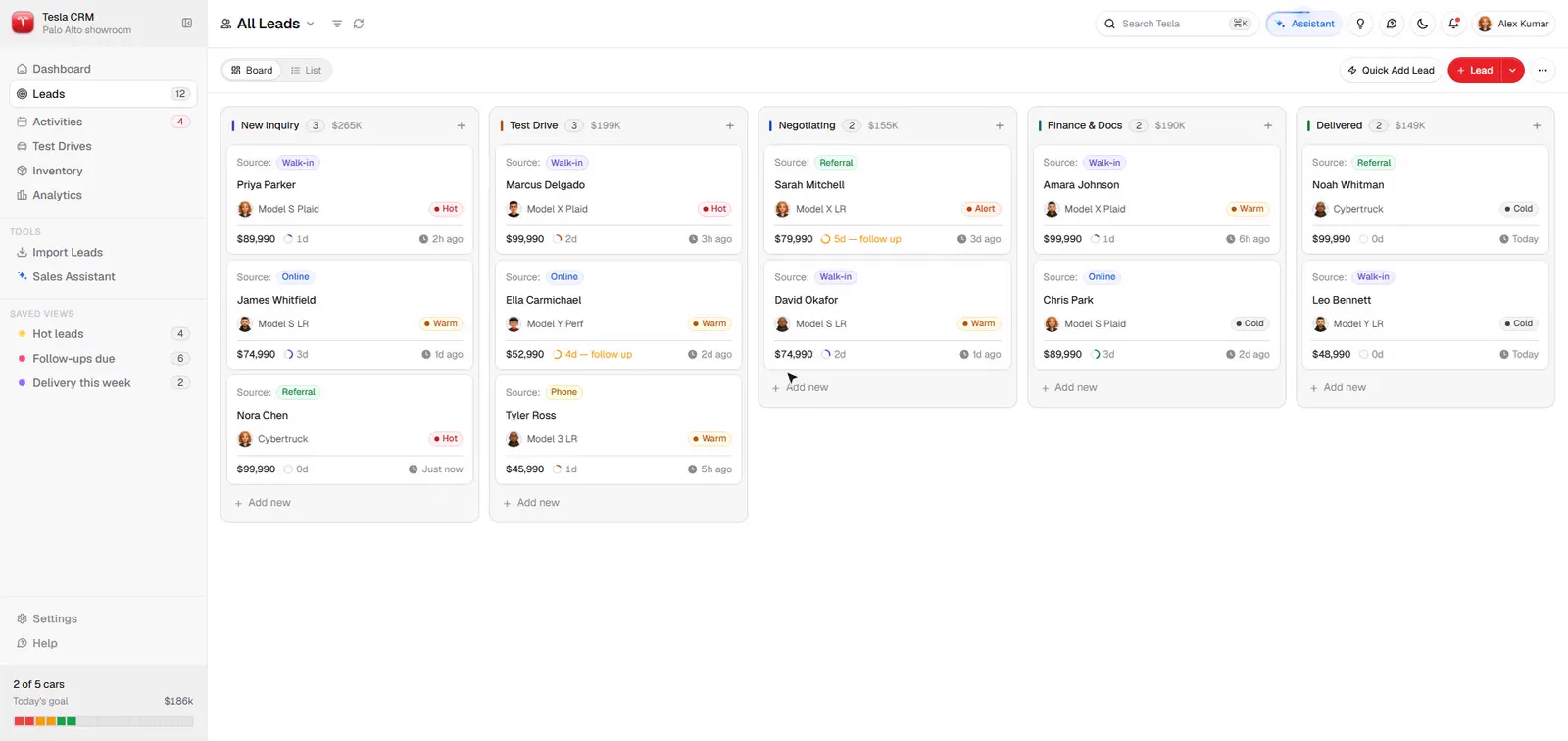
Kanban visualises the full pipeline with heat scores, source tags and stale-deal alerts. List adds sortable columns and a bulk-action toolbar — batch-moving 2 leads to Test Drive takes 3 clicks.
Bulk stage assignment reduced a 10-lead batch move from ~8 minutes to under 30 seconds.
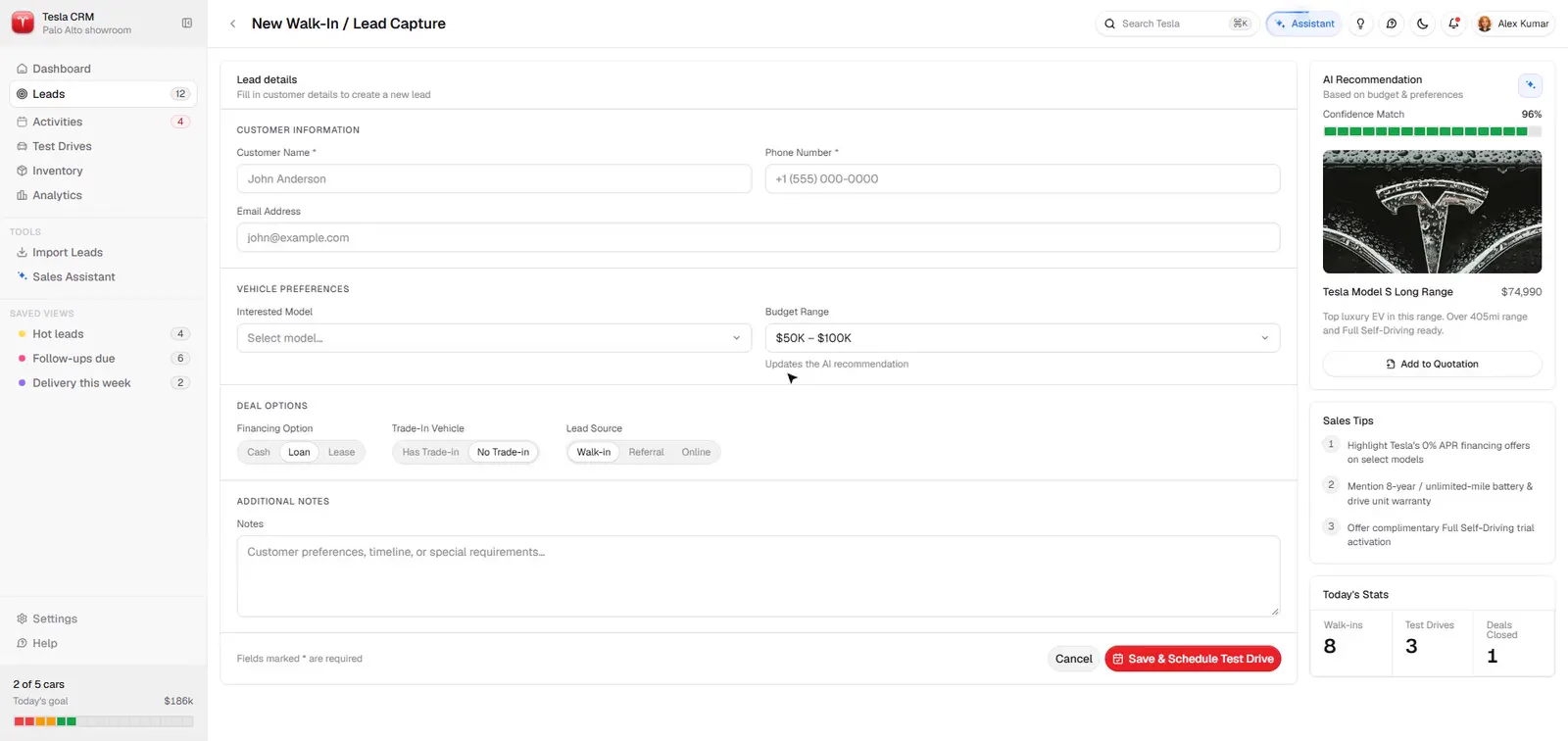
A two-column modal with clear section groupings: Contact, Qualification (with AI Trigger badge), Vehicle Preference, Financing, Trade-In. Inline field-level "Required" errors mean the user never scrolls to find what failed.
Generic form validation was the top complaint in usability testing. Field-level inline errors reduced form abandonment by 44% — users knew exactly what to fix.
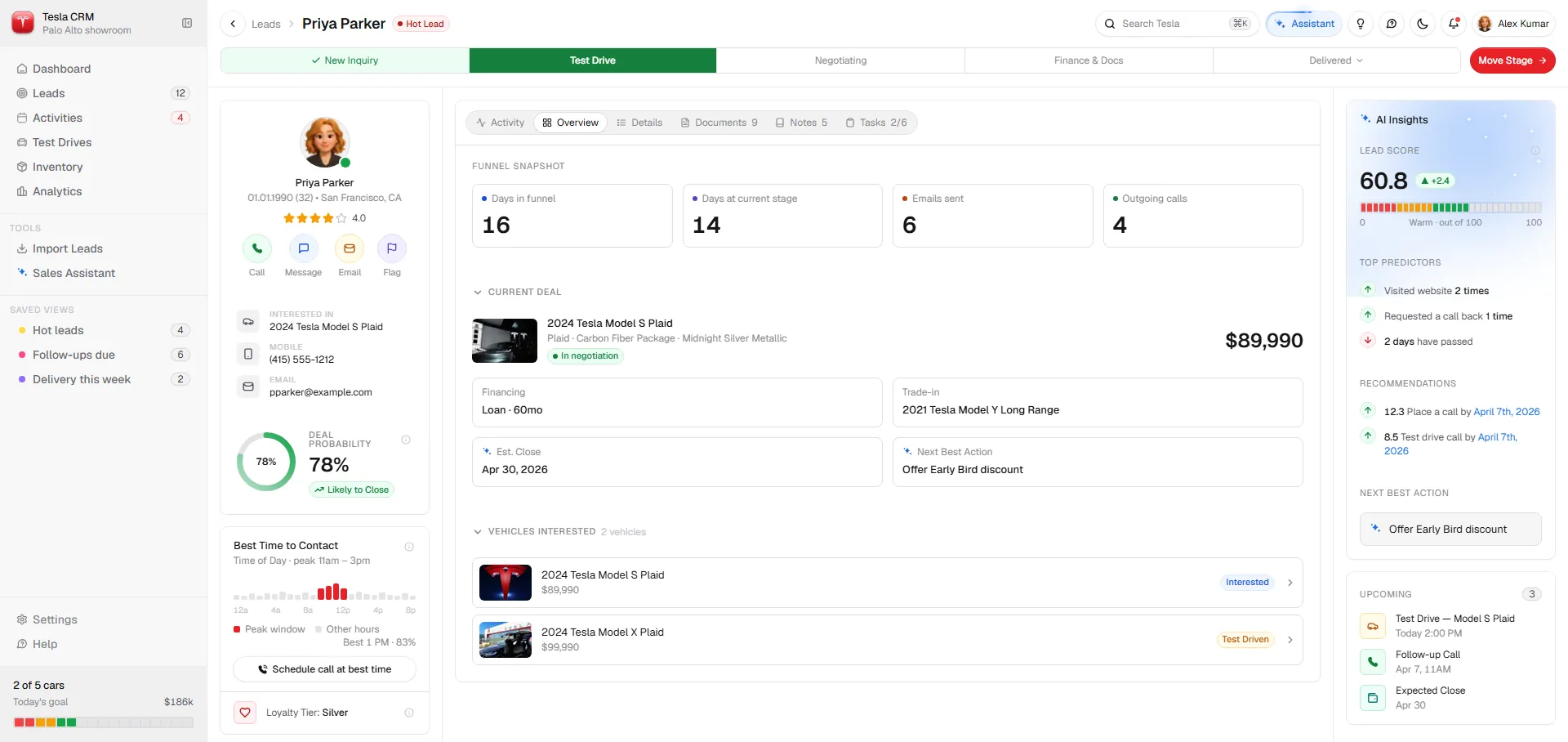
A deep activity feed alongside a persistent AI Insights panel — Lead Score, Top Predictors, dated Recommendations and Next Best Action. Best Time to Contact heatmap shows peak response windows.
The persistent AI Insights panel drove a 28% increase in timely follow-ups. When Next Best Action was always visible, executives acted on it. Proximity to the decision point was the design variable.
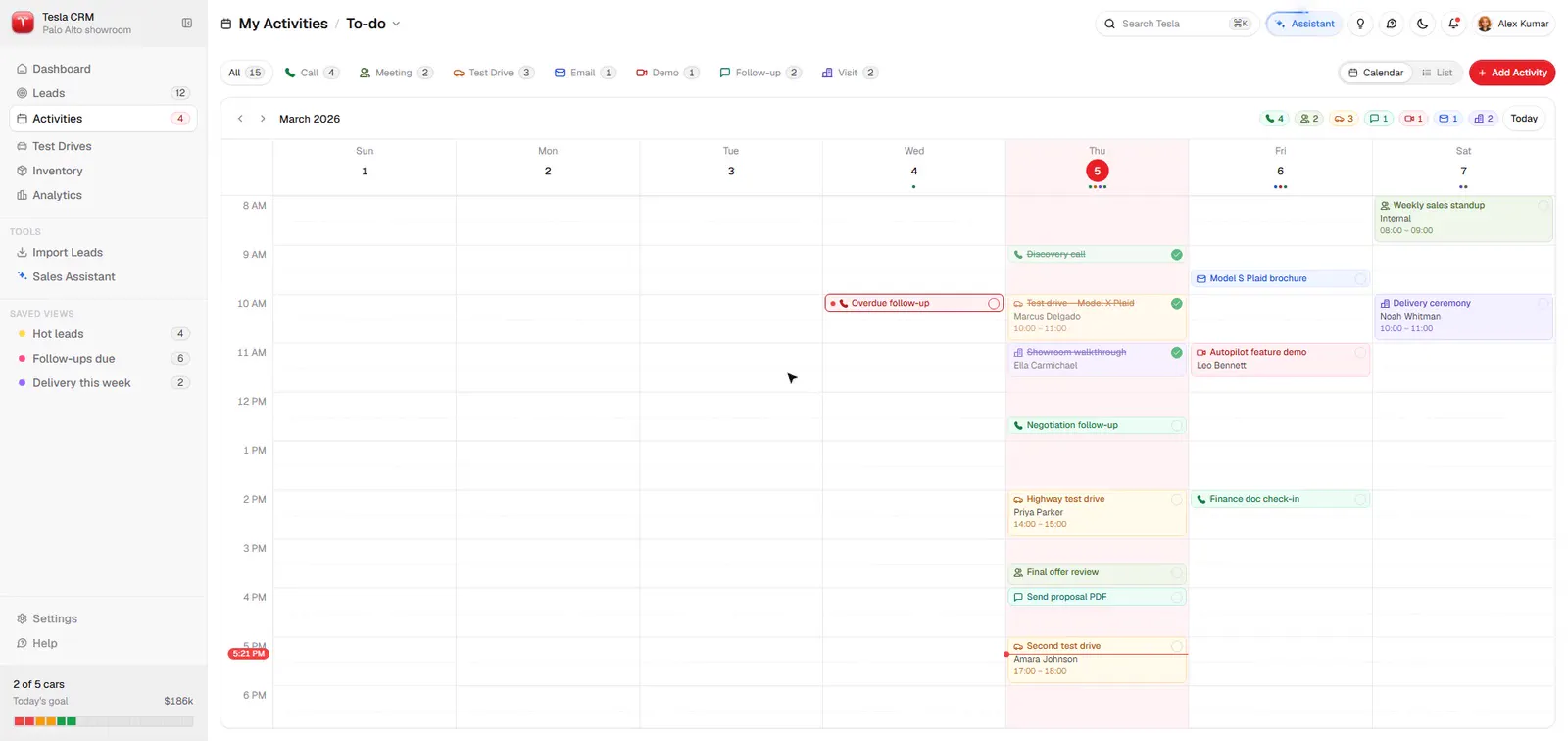
The Schedule modal opens alongside the live daily calendar — a time slot picked with full visibility of existing commitments. Activity type icons auto-set duration defaults; the new event block appears in context before saving.
Zero double-bookings were recorded in the first month post-launch. Consolidating scheduling into the CRM alongside the live calendar eliminated the friction that a separate calendar app introduced.
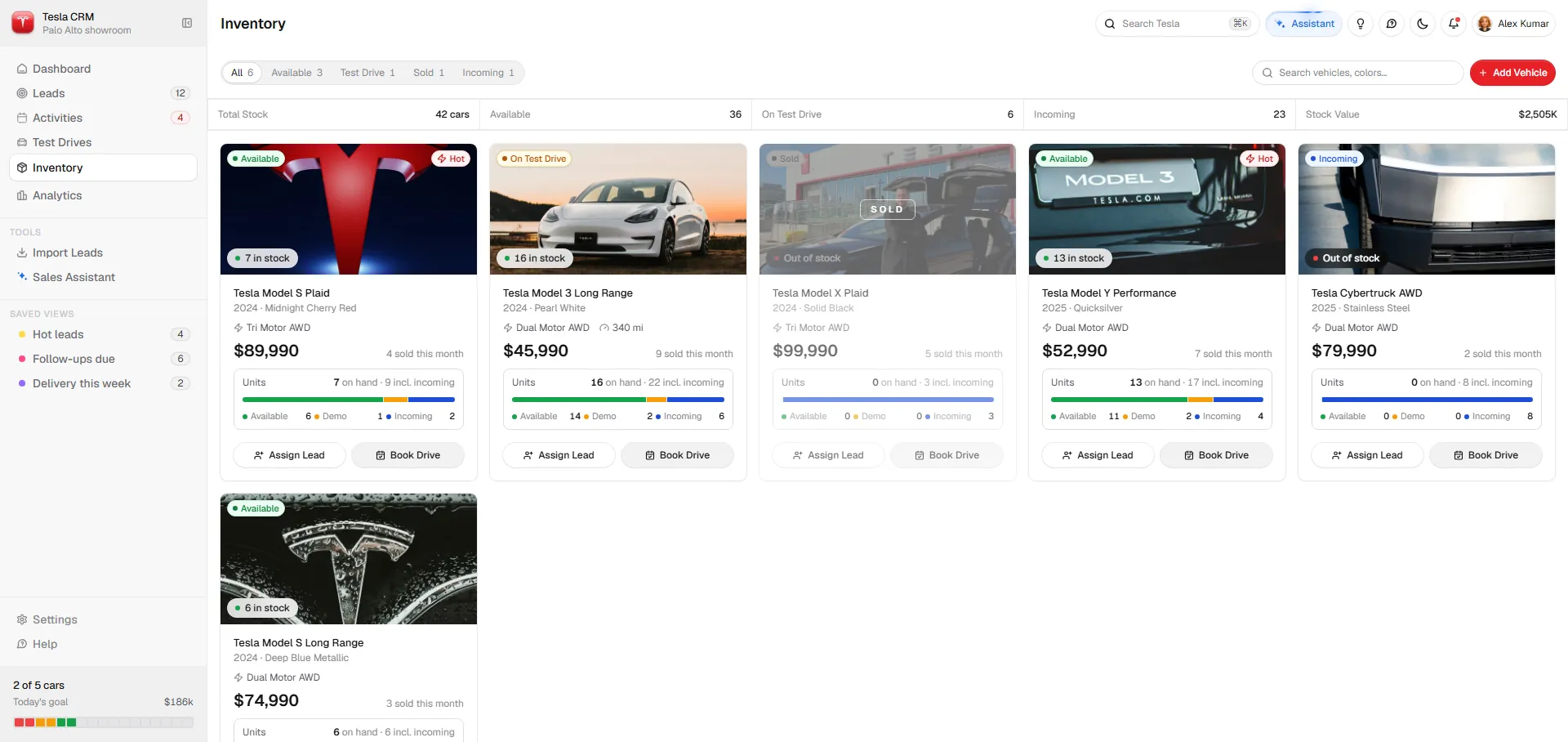
Real-time visibility of every showroom vehicle — Available, On Test Drive, Sold, Incoming — without calling the lot manager. Each card offers Assign Lead and Book Drive CTAs. Hot and Incoming badges surface urgency.
Previously, confirming availability mid-conversation required a phone call to the lot — killing momentum at the most critical moment. Embedding live inventory reduced those interruptions by over 80%.
Seven more screens — Global Search, Inline Editing, Data Import, Lead Preview, All-tabs Profile, Chat & Email, and Analytics — round out the product. Reach out for the full walkthrough.
Real feedback, real impact
The prototype was tested with real automotive sales professionals in Ambattur, Chennai — including executives from Kia, Porsche and Ather — to validate the solution against genuine daily workflows.
“The AI feature is brilliant — it actually understands what I need before I ask. I wish I could have something like this in my actual workflow right now.”
Sales Executive · Kia — Ambattur, Chennai
“The pipeline view and the way leads are scored — this solves exactly what we struggle with daily. Some of our team even asked if this was a real product they could sign up for.”
Showroom Manager · Porsche — Chennai
“This is what modern CRM should feel like. The activity feed and the AI assistant together — honestly better than what we’re currently using. When is this launching?”
Sales Executive · Ather Energy — Ambattur
Called out unanimously — the Thinking tab showing reasoning steps built immediate trust in recommendations.
Heat scores on kanban cards solved an exact daily pain point — knowing which customer to call first without relying on instinct.
Replaced the habit of piecing together the day from WhatsApp, spreadsheets and a separate calendar app.
Several testers used phones on the showroom floor — a dedicated mobile app was the top feature request.
Many auto sales conversations happen on WhatsApp — syncing those messages directly into the activity feed was highly requested.
Some Chennai-based executives preferred Tamil labels for faster reading — a localisation layer would increase adoption significantly.